How Zero-Trust Security Can Strengthen IT Protection for Medical Practices
Learn how Zero-Trust Security can help medical practices protect patient data, strengthen access controls, reduce cyber risks, and support HIPAA compliance.
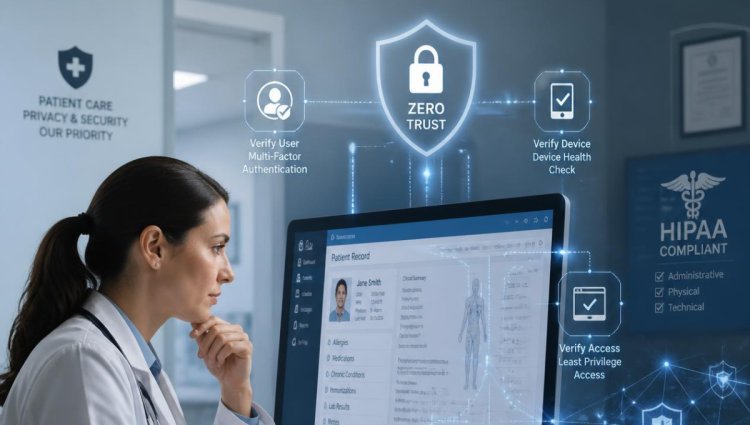
Healthcare organizations manage some of the most sensitive information in the digital world. Patient records, medical histories, insurance information, diagnostic results, billing information, and other forms of Protected Health Information (PHI) must be protected from unauthorized access. At the same time, physicians and staff need reliable access to technology to provide timely and effective patient care.
This creates a challenging security environment for medical practices. Traditional security approaches that rely primarily on network boundaries, passwords, and antivirus software may not be enough to protect today's increasingly connected healthcare environments.
This is where Zero-Trust Security for Medical Practices can provide an important additional layer of protection.
A Zero Trust approach operates on a straightforward principle: never automatically trust a user, device, application, or connection simply because it is inside the organization's network. Verify access before allowing it and continuously evaluate whether that access should continue.
For medical practices, this approach can help strengthen medical IT security, protect sensitive patient information, and reduce the potential impact of compromised accounts or devices.
What Is Zero-Trust Security?
Zero Trust is a cybersecurity strategy based on the idea that no user or device should receive automatic trust.
Instead of assuming that everything inside a medical practice's network is safe, Zero Trust requires verification and appropriate authorization before access is granted.
For example, consider an employee who normally works at a medical practice and has access to patient records. Under a traditional security model, successfully logging into the organization's network may provide access to numerous internal resources.
With a Zero Trust healthcare approach, the system can evaluate several factors before granting access, including:
- Who is requesting access
- What device is being used
- Where the request originates
- What application or information is being requested
- Whether the user is authorized to access that information
- Whether the device meets established security requirements
- Whether the requested activity is consistent with normal behavior
Access can then be limited to the resources that the individual actually needs.
This principle is particularly useful in healthcare because employees often have different responsibilities and therefore require different levels of access.
Why Medical Practices Need Stronger IT Security
Medical practices increasingly depend on interconnected technology. Electronic health records, cloud applications, medical devices, billing platforms, patient portals, email, remote access tools, and other systems all contribute to modern healthcare operations.
While these technologies improve efficiency, they can also create additional opportunities for cyber threats.
A compromised employee password, an unsecured device, a phishing attack, or an improperly configured application could potentially expose sensitive information.
That's why medical practice IT security should extend beyond simply installing antivirus software or placing a firewall around the network.
A comprehensive security strategy should consider users, devices, applications, networks, data, and access privileges.
LA Medical IT specializes in IT services for healthcare organizations and emphasizes security, HIPAA requirements, proactive infrastructure management, and support tailored to medical environments.
1. Zero Trust Helps Control Access to Patient Information
One of the biggest benefits of Zero Trust is more precise access control.
Not every employee needs access to every patient record or application. A receptionist, physician, billing specialist, nurse, and IT administrator may each require different permissions.
With a Zero Trust strategy, organizations can implement least-privilege access, giving users only the permissions necessary for their responsibilities.
For example, a billing employee may need access to insurance and payment information but may not need administrative access to clinical systems.
Restricting unnecessary permissions can reduce the potential damage if an account is compromised.
This is especially important for patient data security, where unauthorized access can create serious privacy, operational, and compliance concerns.
2. It Adds Protection Against Compromised Credentials
Passwords remain an important part of many cyberattacks.
If an attacker obtains a legitimate username and password, traditional security systems may have difficulty determining whether the person logging in is actually the authorized employee.
Zero Trust can introduce additional verification requirements, such as multi-factor authentication (MFA) and device verification.
Instead of relying solely on a password, the system can require additional evidence that the person and device should be trusted.
For medical practices, this can provide an important defense against phishing, credential theft, and unauthorized account access.
3. It Protects Remote and Cloud-Based Access
Healthcare organizations increasingly use cloud applications and remote access technologies. Physicians and authorized employees may need to access systems from different locations and devices.
This flexibility can improve productivity, but it also makes traditional network-based security models more difficult to maintain.
Zero Trust is designed around the assumption that users may need to access resources from outside the traditional office network.
Rather than automatically trusting a connection because it comes from an internal network, Zero Trust evaluates the request itself.
This can make it particularly valuable for practices supporting remote work, cloud applications, mobile devices, and distributed healthcare teams.
4. Zero Trust Can Reduce the Impact of a Security Breach
No cybersecurity strategy can guarantee that an organization will never experience an attack.
The goal is therefore not only to prevent attacks but also to limit their potential impact.
Suppose an employee's credentials are compromised. If that account has broad access across the organization's systems, an attacker may have more opportunities to move through the environment.
With properly implemented Zero Trust controls, access can be restricted according to the user's role, device, application, and other security conditions.
This segmentation can make it harder for an attacker to move from one compromised account or system to other sensitive resources.
5. It Supports a Stronger HIPAA Security Strategy
Medical practices have important responsibilities for protecting patient information. HIPAA includes requirements related to safeguards for electronic protected health information.
Zero Trust is not itself a HIPAA certification or a guarantee of HIPAA compliance. Instead, it can support broader security and risk-management efforts by strengthening controls around authentication, authorization, monitoring, and access.
A medical practice should still conduct appropriate risk assessments and implement administrative, physical, and technical safeguards based on its specific environment.
LA Medical IT provides HIPAA-focused IT services and security assessments designed to help healthcare organizations identify vulnerabilities and address security requirements. Its HIPAA resources describe areas such as access management, security awareness, audit controls, authentication, backups, and contingency planning.
6. It Encourages Continuous Monitoring
Zero Trust is not a one-time security installation.
It requires ongoing evaluation of users, devices, applications, and access activity.
For a medical practice, continuous monitoring can help identify unusual behavior that may warrant investigation.
For example, an account suddenly attempting to access resources it does not normally use could trigger additional verification or an alert.
This proactive approach can complement other healthcare cybersecurity technologies such as endpoint protection, firewalls, security monitoring, vulnerability management, backups, and security awareness training.
7. It Helps Secure Medical Devices and Endpoints
Medical practices often operate more than conventional office computers.
Depending on the specialty, a practice may use diagnostic equipment, imaging systems, printers, scanners, specialized workstations, servers, tablets, and other connected devices.
Each connected device represents another potential point of exposure.
A Zero Trust strategy can help organizations establish policies around which devices are permitted to access particular systems and applications.
Device health and security status can also become part of access decisions.
This is one reason a healthcare-focused IT provider can be valuable. Medical IT support requires an understanding of both conventional technology and the specialized systems used in healthcare environments.
How Medical Practices Can Begin Implementing Zero Trust
A medical practice does not necessarily need to transform its entire IT environment overnight.
A practical approach can begin with an assessment of the existing infrastructure.
Step 1: Identify Critical Data and Systems
Determine where sensitive information is stored and which applications are essential to patient care and business operations.
This may include EHR systems, practice management software, billing platforms, email, file servers, cloud applications, and patient portals.
Step 2: Review User Access
Identify who has access to each system and determine whether those permissions are appropriate.
Remove unnecessary accounts and excessive privileges.
Step 3: Strengthen Authentication
Implement multi-factor authentication wherever appropriate and establish strong password policies.
Privileged accounts should receive particular attention because they can provide extensive access to systems and data.
Step 4: Secure Devices
Maintain current operating systems, applications, firmware, antivirus or endpoint protection, and security patches.
LA Medical IT states that its IT Help Desk team manages security patches and updates, including critical patches and firmware updates, as part of its support services.
Step 5: Monitor and Review
Security controls should be reviewed regularly. Changes in staffing, applications, devices, vendors, and workflows can change a practice's risk profile.
Regular assessments can help identify new vulnerabilities before they become larger problems.
Why Work With a Healthcare-Focused IT Provider?
Implementing a Zero Trust strategy requires more than installing a security product.
Medical practices need to consider patient care workflows, specialized applications, medical devices, compliance responsibilities, staff productivity, and business continuity.
A healthcare-focused provider can help evaluate how security controls fit into the practice without unnecessarily disrupting daily operations.
LA Medical IT focuses specifically on healthcare organizations and provides managed IT services, IT help desk support, security solutions, cloud services, business continuity solutions, and HIPAA-related assistance.
The company's approach is also designed around proactive infrastructure management and ongoing monitoring rather than simply responding after an IT problem occurs.
Strengthen Your Medical Practice's Security With LA Medical IT
As healthcare technology continues to evolve, medical practices need security strategies that can adapt to new risks.
Zero-Trust Security for Medical Practices provides a framework for reducing unnecessary access, strengthening authentication, protecting devices, monitoring activity, and limiting the potential impact of compromised accounts.
However, Zero Trust should be considered one component of a broader medical IT security strategy. Strong backups, security awareness, patch management, endpoint protection, access controls, incident response planning, and HIPAA-focused risk assessments all remain important.
If your practice is evaluating its cybersecurity posture, LA Medical IT can help assess your existing IT environment and identify opportunities to strengthen security and support HIPAA-related requirements. The company offers a FREE IT Check-Up that evaluates areas including infrastructure, hardware, software, network architecture, and security measures.
LA Medical IT
Phone: 888-635-9595
Address: 20501 Ventura Blvd., Suite 140, Woodland Hills, CA 91364
What's Your Reaction?